01
Company details
Collect business name, tax or VAT number, address, website and any other fields you need from trade buyers.
Let trade buyers apply for a wholesale account on your Shopify store. Collect company and tax details, approve applications manually or automatically, and create tagged customer accounts so the right buyers see the right prices.


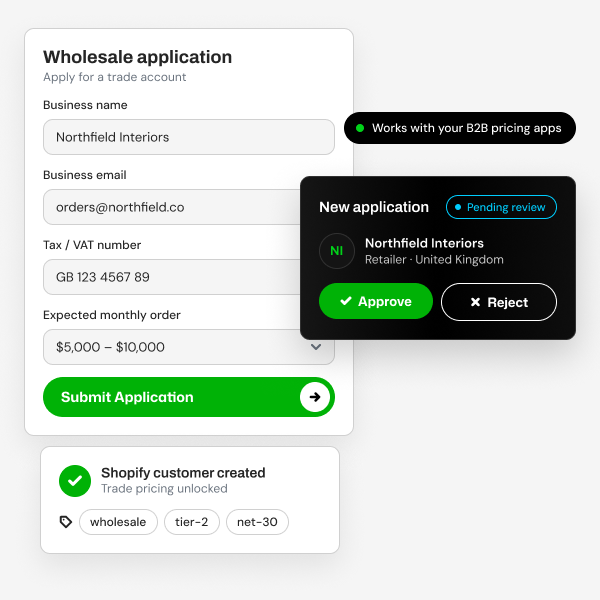
Wholesale buyers want a professional way to apply, and you need the right information before you give them trade pricing.
With Mobimint Form Builder, applicants fill in one clear form. You review the details, approve or reject them, and approved buyers get a Shopify customer account with the tags you choose.
Those tags work with your wholesale pricing, discounts and B2B apps, so new trade customers can order straight away.
From the first application to an approved, tagged customer account.
Collect business name, tax or VAT number, address, website and any other fields you need from trade buyers.
Review each application yourself, or approve buyers automatically when they meet your rules.
Approved applicants become Shopify customers with the tags you set, ready for wholesale pricing and access.
Ask for resale certificates, trade licences or other documents as file uploads.
Show form fields in your customers’ language for international wholesale buyers.
Confirm every application instantly and let your team know when a new buyer applies.
Works with your existing Shopify store and wholesale setup.
Add Mobimint Form Builder from the Shopify App Store.
Start from the wholesale template and choose the business details you need.
Choose manual or automatic approval and the customer tags approved buyers receive.
Add the form to a trade page, review applications and welcome new wholesale customers.
Running Shopify Plus B2B or a custom wholesale setup? Our team can connect it all for you.
Yes. When an application is approved, the buyer gets a Shopify customer account with the tags you choose.
Yes. You can review and approve each application yourself, or switch on automatic approval.
Customer tags are the standard way Shopify wholesale and pricing apps identify trade buyers, so in most setups approved buyers see the right prices straight away.
Yes. You can request files such as resale certificates or trade licences, with file-size limits you set.
No. The registration form and customer tagging work on any Shopify plan.
Yes. Mobimint Form Builder also makes contact, inquiry, quote and custom forms. See our Shopify form builder page.


Install Mobimint Form Builder from the Shopify App Store, or ask our team to set up your B2B registration for you.

Your request has been submitted successfully.
Our mobile app expert will contact you within 24 hours.